For years, developers looking for a personal blogging starter have found themselves stuck in a classic dilemma. On one end lie ultra-minimalist themes: blazing fast, robust, and accessible, yet visually bare, text-only, and lacking any distinct personality. On the other end are flashy templates weighed down by heavy JavaScript bundles, performance-crushing client animations, and fragile dependencies that break on every minor framework upgrade.
When I first encountered AstroPaper (crafted by Sat Naing), I admired its engineering foundation: static rendering with Astro, strict TypeScript typing, outstanding accessibility, and flawless Google Lighthouse scores. But as a developer who loves modern design aesthetics, OS-level micro-interactions, and visual storytelling, I felt that high-performance engine deserved a truly exceptional chassis.
That is how Astro Devosfera came to life: a comprehensive visual and architectural evolution that builds upon AstroPaper to create a dynamic, atmospheric, and developer-centric publishing platform. In this deep dive, we explore the engineering principles, architectural patterns, and full feature set built into the base template (from the initial commit through the Astro <Image /> cover optimization milestone).
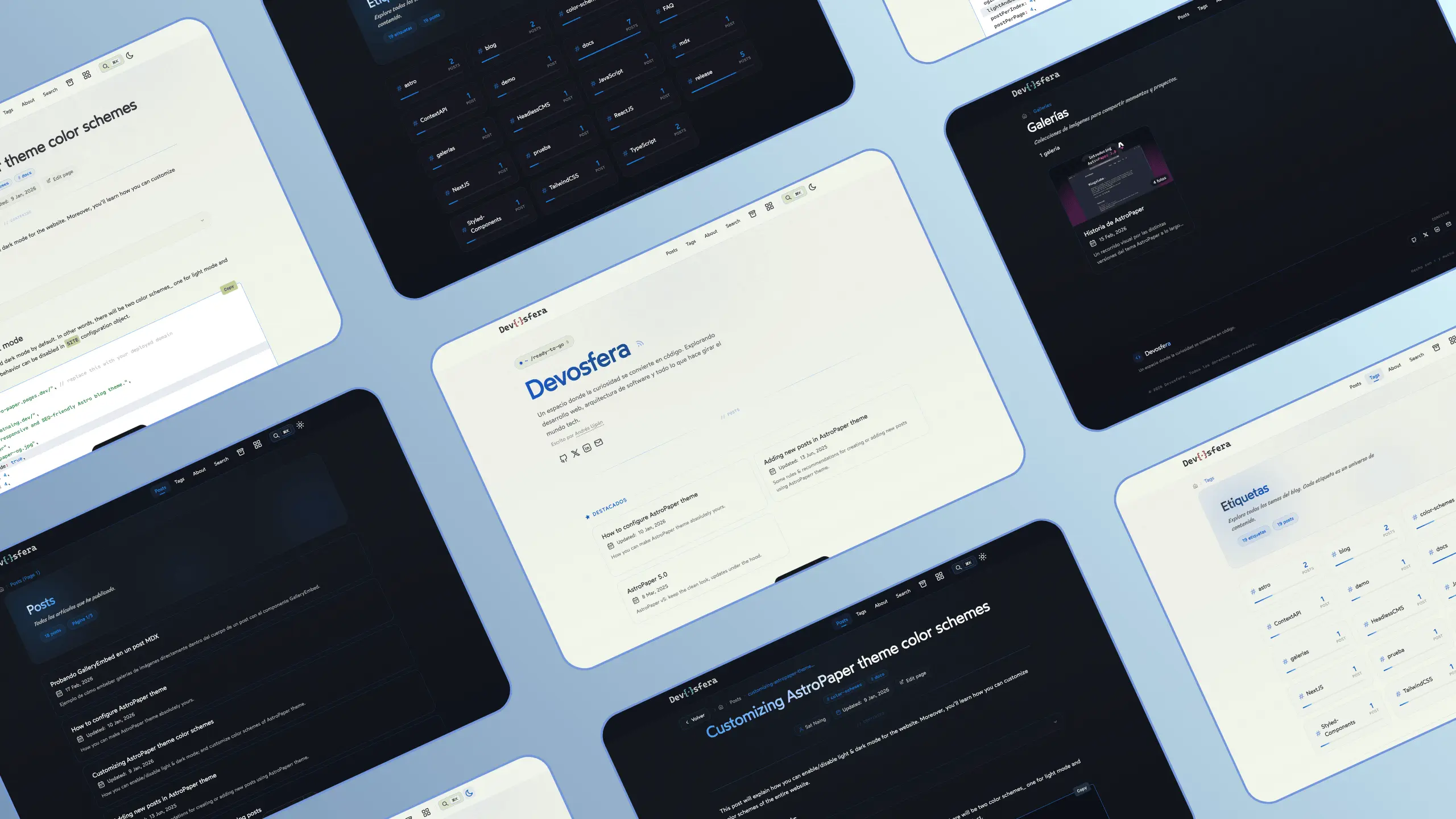
[!NOTE] About this site and the base template:
The website you are browsing (devosfera.vercel.app) is my live personal production blog. It is built upon the open-source template 0xdres/astro-devosfera, but extended with custom advanced personal experiments (such as the interactive terminal, daily physics widgets, Web Audio API sound FX, and quizzes) to serve as a real-world demonstration of what can be built on top of this architecture.🌐 Want to see the clean, unopinionated base template in action? You can explore the live demo at devosfera-blog.vercel.app. The base repository contains the clean, modular, and unopinionated core, ready for you to clone and make your own.
1. The Philosophy: High-Impact Aesthetics with Zero Bloat
The non-negotiable rule guiding every line of code in Astro Devosfera was clear: introduce premium visual interactivity without compromising static performance or accessibility.
To deliver on this promise, we leaned directly into the superpowers of Astro 5:
- Zero JS by default: All layout structures, typography, lighting effects, and UI components are rendered using modern, native CSS (leveraging Tailwind CSS v4,
@property,backdrop-filter, and CSS trigonometric functions). - Surgical interactivity: Interactive features (the search modal, audio player, and photo lightbox) are strictly isolated, lazy-loaded on demand, or implemented using native browser standards like
<dialog>rather than heavy third-party UI libraries. - Seamless navigation: Powered by Astro View Transitions, providing smooth, SPA-like client routing while preserving global states (such as continuous audio playback).
2. Visual Identity, Atmosphere, and Micro-interactions
A reader’s first impression determines whether they stay or bounce. In Astro Devosfera, we crafted an atmosphere inspired by modern developer terminals, balanced by the elegance of a high-end operating system interface.
The Configurable Terminal Hero
On the homepage, the traditional static header is replaced by a terminal-style prompt with an active status ping indicator (~/ready-to-go $), paired with a title featuring an animated shimmer gradient:
// fileName: src/config.ts
export const SITE = {
  // ...
  heroTerminalPrompt: {
    prefix: "~",          // Highlighted segment on the left
    path: "/ready-to-go", // Interactive central path
    suffix: "$",          // Terminal prompt symbol on the right
  },
  backdropEffects: {
    cursorGlow: true,     // Soft glowing halo tracking the cursor
    grain: true,          // Subtle film-grain dithering texture
  },
};
This prompt is completely configurable from the site’s central settings, allowing authors to change the path to their own handle, domain, or tagline without touching HTML templates.
Dynamic SVG Logo with Cascadia Code & Spring Physics
The header logo is neither a static graphic nor plain text. It is an interactive, text-based SVG rendered in Cascadia Code that reacts dynamically to hover interactions through coordinated spring animations:
- Text separation: On
:hover, the word “Dev” translates left (-4px) and “sfera” translates right (+4px) using an elastic spring curvecubic-bezier(0.34, 1.56, 0.64, 1). - Sphere oscillation: The central symbol
{·}executes a 6-step wiggle animation (-8° → +5° → -3° → +1° → 0°) while scaling up to 1.15x. - Reactive accent glow: A soft
drop-shadowmatches the site’s primary accent color.
// fileName: src/components/Header.astro
.logo-sphere {
  animation: sphere-wiggle 0.6s cubic-bezier(0.34, 1.56, 0.64, 1);
  filter: drop-shadow(0 0 8px rgba(167, 90, 90, 0.5));
}
Reactive Backdrop with Anti-Banding in Oklab Space
One of the most persistent visual glitches on dark-mode websites is color banding, where radial gradients create harsh, stepped rings across the viewport.
In Devosfera, we applied a multi-stage anti-banding pipeline:
- Oklab Color Space: All ambient background gradients are calculated using
color-mix(in oklab, ...)with over 8 distinct color stops, guaranteeing perceptually uniform luminance transitions. - Static Dithering Texture: A lightweight tiled noise texture (
mix-blend-mode: overlay) that breaks up digital steps with near-zero CPU footprint. - Cursor Glow: A 550px ambient radial glow smoothly tracking mouse coordinates (
--site-cx,--site-cy), diffused withblur(40px).
3. Built-in Photo Galleries (/galleries)
One of the most requested features in the original AstroPaper project (tracked in upstream issue #553) was a native way to publish photo albums without relying on external embeds like Cloudinary, Flickr, or Unsplash.
In Astro Devosfera, we engineered a first-class photo gallery engine:
Folder-Based Album Architecture
Creating an album is as simple as adding a folder inside src/data/galleries/ containing an index.md file alongside your images:
src/data/galleries/
└── urban-photography/
    ├── index.md           # Metadata: title, description, pubDatetime, tags
    ├── 01-street-rain.jpg
    ├── 02-neon-cross.jpg
    └── 03-subway-exit.jpg
Image ordering is naturally handled via numeric prefixes (01-, 02-), and descriptive accessible alt text is automatically generated from filenames (01-street-rain.jpg → “Street Rain”), ensuring accessibility without extra overhead for authors.
Build-Time Image Processing Pipeline
During pnpm build, images are processed at compile time via import.meta.glob:
- Automatic conversion to modern WebP and AVIF formats.
- Generation of responsive
srcsetresolutions (400px, 800px). - Explicit aspect ratio and dimensions to eradicate Cumulative Layout Shift (CLS).
- The first 6 photos are served with
loading="eager"for instant rendering, while subsequent photos useloading="lazy".
Native Zero-Dependency Lightbox
Rather than bundling bulky client libraries like PhotoSwipe or Fancybox, our fullscreen viewer utilizes the native HTML5 <dialog> element:
- Instantly opened and dismissed using
.showModal()and.close(). - Full keyboard navigation: left arrow (
←) and right arrow (→) to flip through slides, andEscto close. - Full compatibility with Astro View Transitions, cleanly re-attaching event handlers on
astro:after-swap.
The Global <GalleryEmbed /> Component
Want to embed a photo set right inside a technical tutorial written in Markdown or MDX? You can invoke the <GalleryEmbed /> component without importing anything:
// fileName: src/data/blog/en/my-article.mdx
Here are some snapshots of the desk setup:

<GalleryEmbed slug="urban-photography" limit={4} cols={2} />
You can customize visible photo count, grid columns (2, 3, or 4), and whether to display a direct link to the full album.
4. Unified Mixed Feed: Articles and Galleries in Harmony
In most developer themes, media galleries are treated as isolated secondary pages. In Astro Devosfera, we created a configurable mixed feed toggled right from src/config.ts:
// fileName: src/config.ts
export const SITE = {
  showGalleries: true,
  showGalleriesInIndex: true, // Seamlessly interleaves photo collections into the main feed
};
When showGalleriesInIndex is enabled:
- Galleries appear alongside articles in reverse-chronological order on the home page,
/posts,/archives,/tags, and/rss.xml. - Each gallery entry displays a distinct camera icon badge so readers instantly recognize visual collections.
- Strongly typed TypeScript helpers (
src/utils/contentEntry.ts) unify sorting and routing across both collections, avoiding messyanytypes and duplicate path logic.
5. Global Audio Engine with Persistent State (Nanostores)
Music and ambient soundscapes are an essential part of the coding flow for many developers. We wanted Astro Devosfera to offer an uninterrupted, native audio experience as readers navigate through different articles.
┌───────────────────────────────────────────────────────────┐
│              introAudioStore (Nanostores)                 │
│  - isPlaying: boolean                                     │
│  - currentTime: number                                    │
│  - audioSource: stream | file                             │
└─────────────────────────────┬─────────────────────────────┘
                              │ Route persistence
             ┌────────────────┴────────────────┐
             ▼                                 ▼
   [IntroAudio.astro]              [IntroAudioCompact.astro]
     (Homepage Hero)                    (Navbar Header)
The Terminal Hero Player (IntroAudio.astro)
Positioned cleanly at the base of the homepage hero section:
- Terminal aesthetic with a monospaced
$ playcommand prompt. - Circular play/pause button with responsive hover scaling.
- 8 animated CSS equalizer wave bars that pulse rhythmically only while audio is playing.
- Interactive scrubbable progress bar with elapsed and total duration in tabular
M:SSformat.
Continuous Navigation via Compact Header Player
Thanks to a lightweight global store built with Nanostores (src/utils/introAudioStore.ts) and integrated with Astro View Transitions:
- The user hits play on the homepage.
- When clicking into an article, the audio never stutters, restarts, or cuts off.
- A compact mini-player (
IntroAudioCompact.astro) smoothly emerges in the site’s top navigation bar, allowing the user to pause or resume at any point.
Live Lofi Radio Streaming Support
In addition to static audio files (.mp3), the engine supports continuous live web streams:
// fileName: src/config.ts
introAudio: {
  enabled: true,
  src: "https://fluxfm.streamabc.net/flx-chillhop-mp3-128-8581707",
  isStream: true,   // Disables finite progress tracking and enters live stream mode
  label: "LOFI",
  duration: 30,
},
6. Omnipresent Search (⌘K) and the Aurora Modal
Static sites often struggle with search speed and user experience. We built an instant, serverless search system powered by Pagefind:
- Universal shortcut: Hitting
⌘K(on macOS) orCtrl+K(on Windows/Linux), or clicking the magnifying glass in the navbar, summons the search modal from any page. - Zero initial bundle cost: The Pagefind search index and UI bundle are lazy-loaded only upon the first time the modal is opened.
- Aurora Visual Effects: The modal features 3 drifting radial gradient orbs with
blur(70px), an animated rotating border with@property --border-angle, sparkling star accents, and a dynamic cursor glow. - Full keyboard accessibility: Traverse search results using the arrow keys (
↑,↓), jump to an article withEnter, and exit withEsc. - Dedicated
/searchRoute: For users who prefer a full-page search workspace, the/searchpage provides a console layout with mouse-reactive aurora lighting.
7. Reading Experience, Cards, and Developer Polish
Great developer blogs live in the details. We thoroughly overhauled every component of the reading journey:
Fully Clickable Cards with Cursor Tracking
Many blog themes only make the post headline clickable, which causes frustration on mobile devices or during fast browsing. In Devosfera, the entire card surface is an accessible click target without compromising the reader’s ability to select and copy text. Each card tracks the mouse coordinates (--mouse-x, --mouse-y) to cast a soft perimeter glow on hover.
Optimized Cover Images and Flexible Grids
With simple flags in src/config.ts:
showCoverImages: true: Displays post covers (resolved fromogImageor fallbacks) rendered with native Astro<Image />tags for maximum load efficiency.indexPostsGrid: true: Switches recent posts on the homepage between a classic vertical list and a responsive 3-column grid layout.
Annotated Code Blocks via Shiki Transformers
Code snippets support clear documentation helpers right inside standard Markdown blocks:
- Line highlighting: Tagged with
// [!code highlight]. - Visual diffs:
// [!code ++]for green additions and// [!code --]for red deletions. - Filename header pills: Declared with
// fileName: app.ts.
// fileName: example.ts
function calculateMetric(value: number) {
  const base = 42;
  const base = 100;
  return value * base;
}
Table of Contents (TOC) & Secondary Navigation
- Sidebar TOC: Dynamically tracks active headings with smooth scrollspy highlighting, active dot glows, and guide lines.
- Breadcrumb Navigation: Rather than a generic “Back” button, a terminal-pill breadcrumb component shows the exact hierarchical path with smart truncation at 22 characters.
- Back-to-Top Button: A fixed circular button with an SVG scroll-progress ring that visually tracks how much of the post has been read.
8. Fork Privacy, Technical SEO, and Upstream Fixes
To ensure that developers who fork the repository have a frictionless and safe experience, we introduced critical architectural safeguards:
Preventing Data Leaks in Forks
In many starter repositories, social handles (GitHub, X, LinkedIn, email) and the “Edit this post” URL are hardcoded into constants. When community members forked the repo, they often inadvertently linked back to the original creator’s accounts, leading to confusion and unwanted spam.
In Astro Devosfera, we resolved this by moving all personal identity links to environment variables:
# fileName: .env.example
PUBLIC_SOCIAL_GITHUB=https://github.com/your-username
PUBLIC_SOCIAL_X=https://x.com/your-username
PUBLIC_SOCIAL_LINKEDIN=https://linkedin.com/in/your-username
PUBLIC_SOCIAL_EMAIL=mailto:your-email@domain.com
PUBLIC_EDIT_POST_URL=https://github.com/your-username/your-repo/edit/main/
If an environment variable is omitted, the corresponding UI link or button gracefully hides itself without throwing errors or breaking site compilation.
Advanced Technical SEO & Dynamic Satori Banners
- Schema.org JSON-LD: Structured data schemas automatically injected for
BlogPosting,WebSite(with Sitelinks Searchbox),ProfilePage, andImageGallery. - Relational Pagination: Relational
<link rel="prev">and<link rel="next">tags injected into paginated post and tag routes. - Dynamic OG Images: Automated social share images powered by Satori and
@resvg/resvg-js, including custom on-the-fly banners for every individual tag (/tags/[tag]/og.png.ts).
Upstream AstroPaper Bug Fixes
We resolved several longstanding community issues:
- Mobile Table Overflows: Fixed table layouts with responsive wrapping and fluid horizontal auto-scroll (#574).
- Timezone Date Normalization: Swapped fragile JavaScript date routines for Day.js with full UTC and IANA timezone support (#495).
- Secure External Links: Mandated
target="_blank"andrel="noopener noreferrer"attributes across all social and share links (#566).
9. Central Configuration Cheat-Sheet
All theme controls live in src/config.ts. Here is a quick reference of the available toggles:
| Option | Type | Description |
|---|---|---|
showGalleries | boolean | Enables the /galleries route and image albums. |
showGalleriesInIndex | boolean | Mixes photo albums into the main post feed. |
showCoverImages | boolean | Renders cover images inside article cards. |
indexPostsGrid | boolean | Displays recent homepage posts in a 3-column grid. |
showTagsInCards | boolean | Displays tag pills at the bottom of each post card. |
heroTerminalPrompt | object | Configures prefix, path, and suffix for the hero prompt. |
backdropEffects | object | Toggles the cursor glow halo and film-grain overlay. |
introAudio | object | Controls audio player, stream/file source, and label. |
10. Conclusion and Getting Started
Astro Devosfera proves that you don’t have to choose between the spartan speed of a static site and the visual delight of a modern web application. By pairing the speed of Astro with intentional design engineering, you can build a personal platform that is fast, accessible, and deeply engaging.
Base Template vs. Live Production Blog
It is worth highlighting the distinction between the open-source repository and this website:
- The Base Template (github.com/0xdres/astro-devosfera): The clean, neutral, and unopinionated starting point. It contains the complete architecture detailed in this article (configurable terminal hero, Astro
<Image />optimized galleries, Nanostores persistent audio, Pagefind aurora search, mixed feed, and local fonts). You can test the clean demo in action at devosfera-blog.vercel.app (hosted withnoindexto avoid competing on search engines). - This Blog (devosfera.vercel.app): My live personal blog in production. I treat it as an experimental playground and living proof of how far the template can be extended with bespoke features (such as daily physics widgets, web audio synthesizers, and arcade Easter eggs).
[!TIP] How is the public template demo configured to prevent search engine indexing?
The official demo at devosfera-blog.vercel.app is configured withnoindex(protecting your personal blog’s SEO) via theX-Robots-Tagheader invercel.json:{ "headers": [ { "source": "/(.*)", "headers": [ { "key": "X-Robots-Tag", "value": "noindex, nofollow" } ] } ] }Or by configuring
public/robots.txt:User-agent: * Disallow: /
How to Launch Your Own Blog
To start building your blog using the base template:
# 1. Clone the official repository
git clone https://github.com/0xdres/astro-devosfera.git my-blog
cd my-blog

# 2. Install dependencies with pnpm
pnpm install

# 3. Configure your personal details in environment variables
cp .env.example .env

# 4. Start the local development server
pnpm run dev
The template is released under the MIT License. Feel free to fork it, make it your own, and build something extraordinary with it.